

Fill games faster
See available, qualified, nearby officials in one place and assign in a few clicks instead of hunting through your roster.
For assignors
GameSource is built for the assigning job — see who's available and how far away, assign in a few clicks, handle declines and reassignments, and keep pay in sync.
The assigning grind
Most of the work isn't the assignment itself — it's everything around it: availability, distance, declines, and the constant follow-up.
Unfilled games as the dates get closer and your options shrink.
Juggling availability across a long roster of officials.
Last-minute declines and turnbacks that force a scramble to refill.
Group texts and email chains that are impossible to keep straight.
Tracking who has actually confirmed versus who just hasn't replied.
Weighing travel and distance so officials aren't sent across the map.
Keeping qualification and level requirements straight across sports and divisions.
How assigning works in GameSource
Start from the games you need to cover — build your schedule in GameSource or bring it in, across every sport and season you assign.
Officials are surfaced by availability, distance, and qualifications, with conflicts flagged before you commit — so you can see who can actually work the game.
Assign in a few clicks and the officials you picked are notified — no separate group text or email to keep in sync.
Track accepts, declines, turnbacks, and reassignments in one place. When something changes, everyone affected is notified automatically.
Build crews and push time, field, or crew updates straight to the officials involved — changes reach them without another round of texts.
Completed games flow into payment, and that pay data feeds the 1099-NEC forms GameSource files with the IRS for your officials — so assigning and paying stay connected. See how payments work →
In the platform
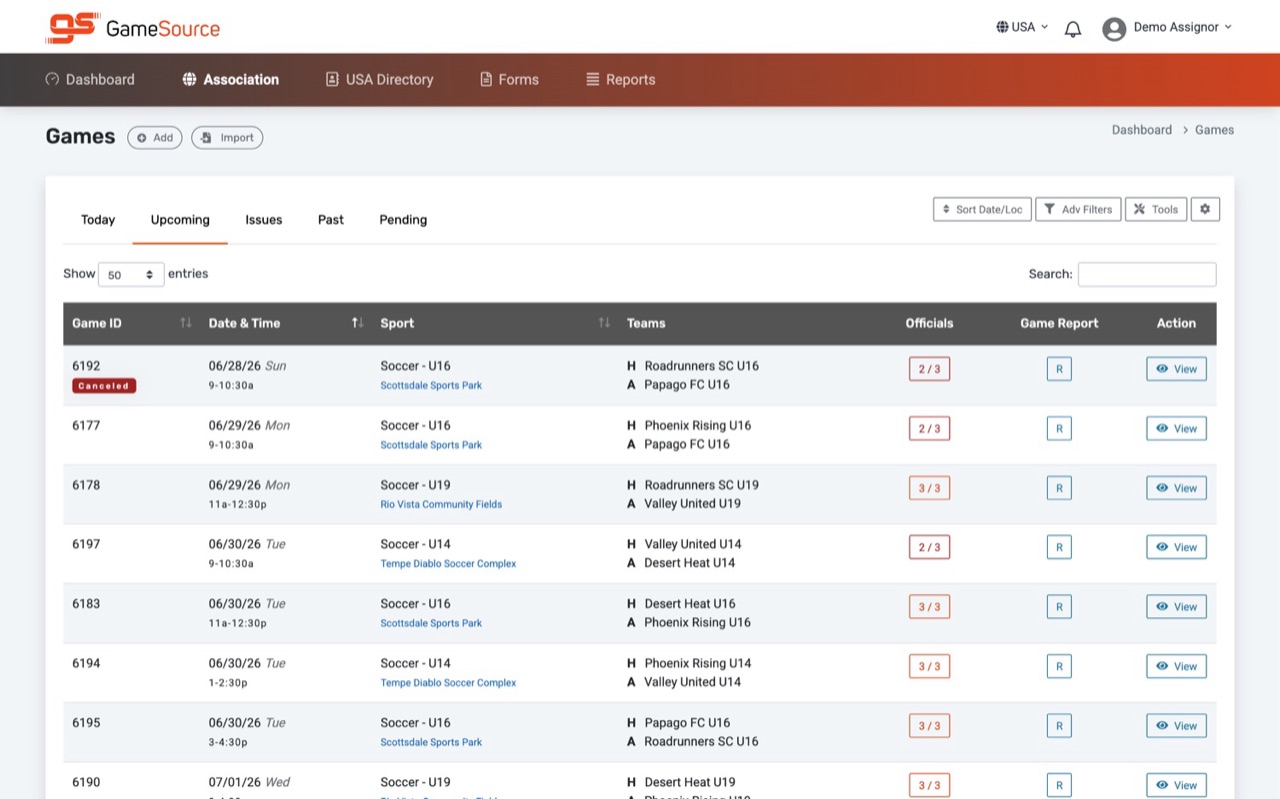
Your games, sports, and teams in one view — with how many officials are assigned to each game at a glance.
“I have switched from Arbiter to GameSource for assigning officials and it has been a great decision. It is super user friendly, fast, and overall a better system.”
See available, qualified, nearby officials in one place and assign in a few clicks instead of hunting through your roster.
Assignments, responses, and schedule changes notify officials automatically — no more chasing replies across texts and email.
Conflicts are visible while you assign, so you catch overlaps and qualification mismatches before they become a problem.
Built for real assigning
Link games by sport and location and assign the official or crew to all of them at once.
Build crews and assign the whole crew to a game in one step.
Track turnbacks and let officials block out dates, so you assign around real availability.
Configure pay rules by payee, sport, level, and official level — including travel pay.
Rank and rate officials to inform who you assign to which games.
Run reports for no-shows and turnbacks, blocks and declines, assignments by sport and travel, and rankings.
Officials' schedules sync to phones, tablets, and Google Calendar.
Game invites, reminders, and real-time change notifications reach everyone affected.
Questions
GameSource surfaces officials by availability, distance, and qualifications, and flags conflicts before you commit — so you can see who can actually work a game and assign the right person in a few clicks.
Declines and turnbacks are tracked, so you can reassign the game to another available, qualified official. When you do, everyone affected is notified — no separate texts or email chains.
Yes. You can assign crews and make time, field, or crew changes, and the officials involved are notified automatically — so updates reach everyone without another round of texts.
Completed games flow into payment. Organizations fund a digital wallet and pay officials by direct deposit, with funds typically arriving within 1–2 business days after a payment is released. That same pay data feeds year-end 1099s, which GameSource generates, files with the IRS, and makes available to officials. See how payments work → See 1099 handling →
Start a free trial anytime, or talk to sales if you manage a larger organization, multi-school group, or complex migration.